Skills and reusable instructions
Install and manage task guidance without confusing instructions with executable permissions.
In this topic
See the actual app · 1 screenshot
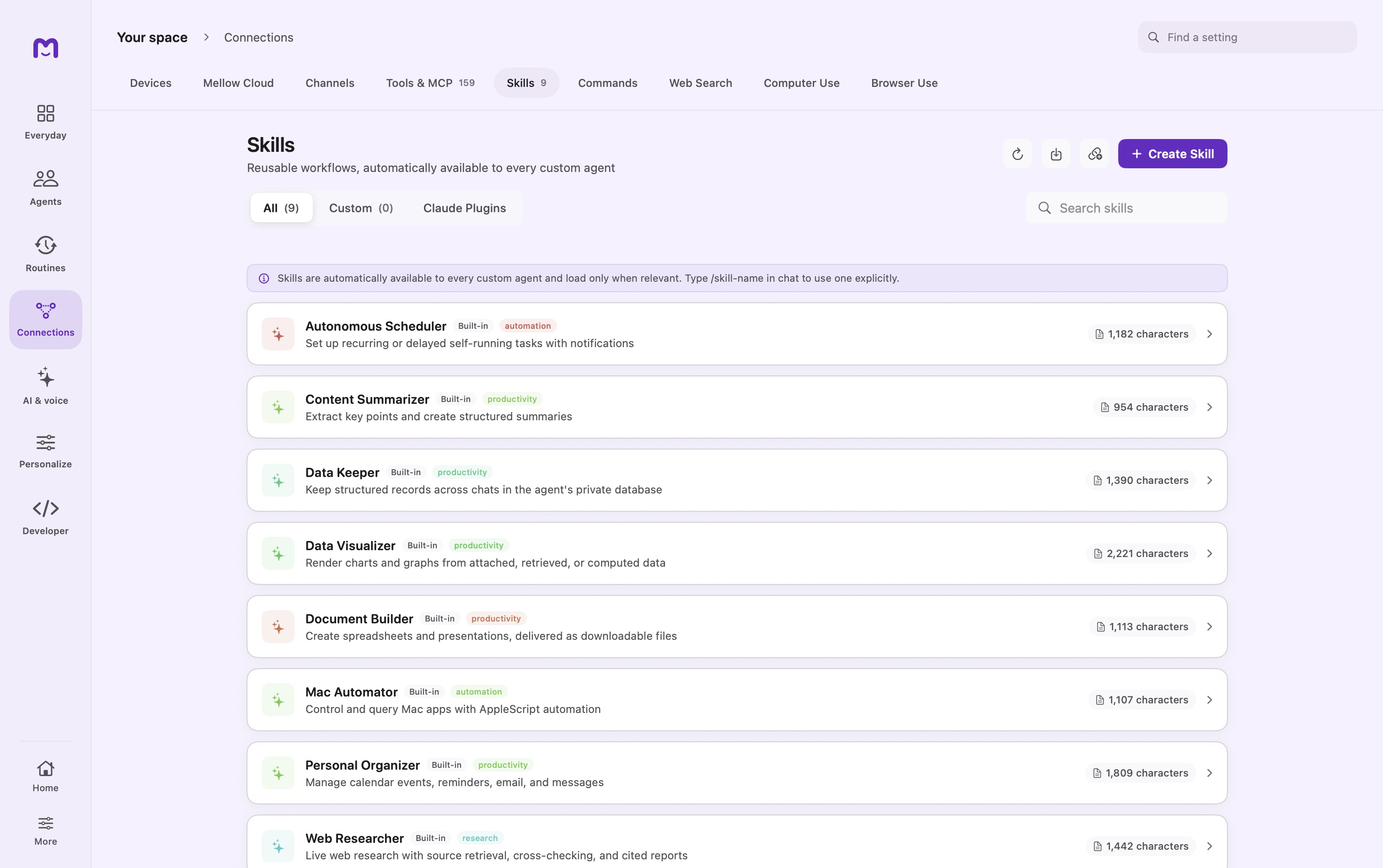
A skill is a playbook: instructions, examples, and optional supporting files for a kind of task. Use skills for how work should be done. Use Knowledge for what the agent should read, and tools for operations it can execute.
A skill can describe a spreadsheet workflow without granting spreadsheet tools. Its instructions still operate within the active agent's capabilities and permissions.
Find and invoke a skill
Open Skills to inspect the installed library. Custom agents using automatic capability selection can discover relevant skills when the task calls for them. For an explicit selection, type / in the composer and choose the skill offered by the command menu.
The slash invocation supplies the skill for that message. Discovery is less deterministic: the model searches names, descriptions, and keywords, then loads the relevant instructions. If a newly added skill does not appear in an existing conversation's initial catalog, start a fresh chat or invoke it explicitly.
The built-in Mellow coordinator has a restricted configuration and delegation role; use a custom agent for a skill-driven task.
Author a focused playbook
Choose Create Skill and provide a clear name, description, keywords, and instructions. Category, author, and version can help you organize a larger collection.
A useful description states the trigger: “Prepare release notes from a reviewed change list.” Keywords should match the language you actually use, such as release notes, changelog, and customer update.
Example skill
---
name: release-note-editor
description: Turn a reviewed change list into customer-facing release notes.
---

# Release note editor

Use this when the user supplies changes for an upcoming release.

1. Identify the audience and release version from the supplied material.
2. Group changes by what users can now do or what was corrected.
3. Keep preview features separate from generally available behavior.
4. Preserve known limitations. Ask for missing evidence instead of guessing.
5. Return a short introduction, grouped changes, and open editorial questions.

Do not publish or send the draft. End with the source items that need review.
The frontmatter is metadata; the body carries the actual workflow. Avoid including credentials in either. Supporting files should be referenced by their relative location inside the skill.
Add supporting material
A skill's references/ directory can hold style notes or checklists. Assets can hold templates where the package format supports them. Keep large reference collections in Knowledge rather than inserting them into every skill invocation.
Loading is budgeted. Some files may be named without their full content when the reference budget is exceeded. If a task depends on an omitted file, the agent must read it through an available path rather than pretend it was included.
Import and maintain
The import flow supports Markdown, JSON, and ZIP skill packages, as well as repository-based discovery. Inspect the selected items before importing. A repository of individual skills and a complete plugin marketplace are different package shapes; not every skill repository needs a marketplace manifest.
For ZIPs, keep the skill entrypoint in the expected root or named skill folder. For Markdown, use valid frontmatter. If an import fails, inspect its format and error before renaming files at random.
Built-in, custom, and plugin-owned skills have different ownership. Edit or delete your own imported skills directly. Update or remove plugin-owned skills through their package. Built-in material is not edited through the custom-skill editor.
Ask an agent to revise a custom skill
The update_skill operation applies targeted changes to a writable custom skill. Review the proposed edit and reason. A requested find string must resolve as expected; a failed match should stop the change rather than silently selecting unrelated text.
After editing, run a small representative prompt with the skill explicitly selected. Check output structure and any required tool operations. Improving a description helps discovery; improving instructions helps execution after loading.
How skills get picked
Automatic capability discovery uses the skill's descriptive metadata. Full instructions are loaded when selected, keeping the initial catalog smaller. A skill can be present but unused because its description does not match the task, the agent is in an incompatible tool mode, or the required capability is unavailable.
Check those conditions before assuming the import failed. Use Methods for procedural records and Tools for executable dependencies.
Continue exploring · Build your agent teamReusable workflows →Save procedures for work you repeat and decide when an agent should use them.